Documentation Index

Fetch the complete documentation index at: https://astronomer-preview.mintlify.app/llms.txt

Use this file to discover all available pages before exploring further.

Info This page has not yet been updated for Airflow 3. The concepts shown are relevant, but some code may need to be updated. If you run any examples, take care to update import statements and watch for any other breaking changes.
Weights and Biases (W&B) is a machine learning platform for model management that includes features like experiment tracking, dataset versioning, and model performance evaluation and visualization. Using W&B with Airflow gives you a powerful ML orchestration stack with first-class features for building, training, and managing your models. In this tutorial, you’ll learn how to create an Airflow DAG that completes feature engineering, model training, and predictions with the Astro Python SDK and scikit-learn, and registers the model with W&B for evaluation and visualization.
Info This tutorial was developed in partnership with Weights and Biases. For resources on implementing other use cases with W&B, see Tutorials.

Time to complete

This tutorial takes approximately one hour to complete.

Assumed knowledge

To get the most out of this tutorial, you should be familiar with:

Prerequisites

Quickstart

If you have a Github account, you can get started quickly by cloning the demo repository. For more detailed instructions for setting up the project, start with Step 1.
  1. Clone the demo repository:
    git clone https://github.com/astronomer/airflow-wandb-demo
    cd airflow-wandb-demo
    
  2. Update the .env file with your WANDB_API_KEY.
  3. Start Airflow by running:
    astro dev start
    
  4. Continue with Step 7 below.

Step 1: Configure your Astro project

Use the Astro CLI to create and run an Airflow project locally.
  1. Create a new Astro project:
    $ mkdir astro-wandb-tutorial && cd astro-wandb-tutorial
    $ astro dev init
    
  2. Add the following line to the requirements.txt file of your Astro project:
    astro-sdk-python[postgres]==1.5.3
    wandb==0.14.0
    pandas==1.5.3
    numpy==1.24.2
    scikit-learn==1.2.2
    
    This installs the packages needed to transform the data and run feature engineering, model training, and predictions.

Step 2: Prepare the data

This tutorial will create a model that classifies churn risk based on customer data.
  1. Create a subfolder called data in your Astro project include folder.
  2. Download the demo CSV files from this GitHub directory.
  3. Save the downloaded CSV files in the include/data folder. You should have 5 files in total.

Step 3: Create your SQL transformation scripts

Before feature engineering and training, the data needs to be transformed. This tutorial uses the Astro Python SDK transform_file function to complete several transformations using SQL.
  1. Create a file in your include folder called customer_churn_month.sql and copy the following code into the file.
    with subscription_periods as (
        select subscription_id, 
            customer_id, 
            cast(start_date as date) as start_date, 
            cast(end_date as date) as end_date, 
            monthly_amount 
            from {{subscription_periods}}
    ),
    
    months as (
        select cast(date_month as date) as date_month from {{util_months}}
    ),
    
    customers as (
        select
            customer_id,
            date_trunc('month', min(start_date)) as date_month_start,
            date_trunc('month', max(end_date)) as date_month_end
        from subscription_periods
        group by 1
    ),
    
    customer_months as (
        select
            customers.customer_id,
            months.date_month
        from customers
        inner join months
            on  months.date_month >= customers.date_month_start
            and months.date_month < customers.date_month_end
    ),
    
    joined as (
        select
            customer_months.date_month,
            customer_months.customer_id,
            coalesce(subscription_periods.monthly_amount, 0) as mrr
        from customer_months
        left join subscription_periods
            on customer_months.customer_id = subscription_periods.customer_id
            and customer_months.date_month >= subscription_periods.start_date
            and (customer_months.date_month < subscription_periods.end_date
                    or subscription_periods.end_date is null)
    ),
    
    customer_revenue_by_month as (
        select
            date_month,
            customer_id,
            mrr,
            mrr > 0 as is_active,
            min(case when mrr > 0 then date_month end) over (
                partition by customer_id
            ) as first_active_month,
    
            max(case when mrr > 0 then date_month end) over (
                partition by customer_id
            ) as last_active_month,
    
            case
            when min(case when mrr > 0 then date_month end) over (
                partition by customer_id
            ) = date_month then true
            else false end as is_first_month,
            case
            when max(case when mrr > 0 then date_month end) over (
                partition by customer_id
            ) = date_month then true
            else false end as is_last_month
        from joined
    ),
    
    joined1 as (
    
        select
            date_month + interval '1 month' as date_month,
            customer_id,
            0::float as mrr,
            false as is_active,
            first_active_month,
            last_active_month,
            false as is_first_month,
            false as is_last_month
    
        from customer_revenue_by_month
    
        where is_last_month
    
    )
    
    select * from joined1;
    
  2. Create another file in your include folder called customers.sql and copy the following code into the file.
    with
    customers as (
    
        select *
        from {{customers_table}}
    
    ),
    
    orders as (
    
        select *
        from {{orders_table}}
    
    ),
    
    payments as (
    
        select *
        from {{payments_table}}
    
    ),
    
    customer_orders as (
    
        select
        customer_id,
        cast(min(order_date) as date) as first_order,
        cast(max(order_date) as date) as most_recent_order,
        count(order_id) as number_of_orders
        from orders
    
        group by customer_id
    
    ),
    
    customer_payments as (
    
        select
        orders.customer_id,
        sum(amount / 100) as total_amount
    
        from payments
    
        left join orders on payments.order_id = orders.order_id
    
        group by orders.customer_id
    
    ),
    
    final as (
    
        select
        customers.customer_id,
        customers.first_name,
        customers.last_name,
        customer_orders.first_order,
        customer_orders.most_recent_order,
        customer_orders.number_of_orders,
        customer_payments.total_amount as customer_lifetime_value
    
        from customers
    
        left join customer_orders on customers.customer_id = customer_orders.customer_id
    
        left join customer_payments on customers.customer_id = customer_payments.customer_id
    
    )
    
    select
    *
    from final
    

Step 4: Create a W&B API Key

In your W&B account, create an API key that you will use to connect Airflow to W&B. You can create a key by going to the Authorize page or your user settings.

Step 5: Set up your connections and environment variables

You’ll use environment variables to create Airflow connections to Snowflake and W&B, as well as to configure the Astro Python SDK.
  1. Open the .env file in your Astro project and paste the following code.
    WANDB_API_KEY='<your-wandb-api-key>'
    AIRFLOW_CONN_POSTGRES_DEFAULT='postgresql://postgres:postgres@host.docker.internal:5432/postgres?options=-csearch_path%3Dtmp_astro'
    
  2. Replace <your-wandb-api-key> with the API key you created in Step 4. No changes are needed for the AIRFLOW_CONN_POSTGRES_DEFAULT environment variable.

Step 6: Create your DAG

  1. Create a file in your Astro project dags folder called customer_analytics.py and copy the following code into the file:
    from datetime import datetime
    import os
    
    from astro import sql as aql
    from astro.files import File
    from astro.sql.table import Table
    from airflow.decorators import dag, task_group
    
    import pandas as pd
    import numpy as np
    from sklearn.model_selection import train_test_split
    from sklearn.ensemble import RandomForestClassifier
    import tempfile
    import pickle
    from pathlib import Path
    
    import wandb
    from wandb.sklearn import plot_precision_recall, plot_feature_importances
    from wandb.sklearn import plot_class_proportions, plot_learning_curve, plot_roc
    
    _POSTGRES_CONN = "postgres_default"
    wandb_project = "demo"
    wandb_team = "astro-demos"
    local_data_dir = "include/data"
    sources = ["subscription_periods", "util_months", "customers", "orders", "payments"]
    
    
    @dag(schedule=None, start_date=datetime(2023, 1, 1), catchup=False)
    def customer_analytics():
        @task_group()
        def extract_and_load(sources: list) -> dict:
            for source in sources:
                aql.load_file(
                    task_id=f"load_{source}",
                    input_file=File(f"{local_data_dir}/{source}.csv"),
                    output_table=Table(
                        name=f"STG_{source.upper()}", conn_id=_POSTGRES_CONN
                    ),
                    if_exists="replace",
                )
    
        @task_group()
        def transform():
            aql.transform_file(
                task_id="transform_churn",
                file_path=f"{Path(__file__).parent.as_posix()}/../include/customer_churn_month.sql",
                parameters={
                    "subscription_periods": Table(
                        name="STG_SUBSCRIPTION_PERIODS", conn_id=_POSTGRES_CONN
                    ),
                    "util_months": Table(name="STG_UTIL_MONTHS", conn_id=_POSTGRES_CONN),
                },
                op_kwargs={
                    "output_table": Table(
                        name="CUSTOMER_CHURN_MONTH", conn_id=_POSTGRES_CONN
                    )
                },
            )
    
            aql.transform_file(
                task_id="transform_customers",
                file_path=f"{Path(__file__).parent.as_posix()}/../include/customers.sql",
                parameters={
                    "customers_table": Table(name="STG_CUSTOMERS", conn_id=_POSTGRES_CONN),
                    "orders_table": Table(name="STG_ORDERS", conn_id=_POSTGRES_CONN),
                    "payments_table": Table(name="STG_PAYMENTS", conn_id=_POSTGRES_CONN),
                },
                op_kwargs={"output_table": Table(name="CUSTOMERS", conn_id=_POSTGRES_CONN)},
            )
    
        @aql.dataframe()
        def features(customer_df: pd.DataFrame, churned_df: pd.DataFrame) -> pd.DataFrame:
            customer_df["customer_id"] = customer_df["customer_id"].apply(str)
            customer_df.set_index("customer_id", inplace=True)
    
            churned_df["customer_id"] = churned_df["customer_id"].apply(str)
            churned_df.set_index("customer_id", inplace=True)
            churned_df["is_active"] = churned_df["is_active"].astype(int).replace(0, 1)
    
            df = (
                customer_df[["number_of_orders", "customer_lifetime_value"]]
                .join(churned_df[["is_active"]], how="left")
                .fillna(0)
                .reset_index()
            )  # inplace=True)
    
            return df
    
        @aql.dataframe()
        def train(df: pd.DataFrame) -> dict:
            features = ["number_of_orders", "customer_lifetime_value"]
            target = ["is_active"]
    
            test_size = 0.3
            X_train, X_test, y_train, y_test = train_test_split(
                df[features], df[target], test_size=test_size, random_state=1883
            )
            X_train = np.array(X_train.values.tolist())
            y_train = np.array(y_train.values.tolist()).reshape(
                len(y_train),
            )
            y_train = y_train.reshape(
                len(y_train),
            )
            X_test = np.array(X_test.values.tolist())
            y_test = np.array(y_test.values.tolist())
            y_test = y_test.reshape(
                len(y_test),
            )
    
            model = RandomForestClassifier()
            _ = model.fit(X_train, y_train)
            model_params = model.get_params()
    
            y_pred = model.predict(X_test)
            y_probas = model.predict_proba(X_test)
            importances = model.feature_importances_
            indices = np.argsort(importances)[::-1]
    
            wandb.login()
            run = wandb.init(
                project=wandb_project,
                config=model_params,
                entity=wandb_team,
                group="wandb-demo",
                name="jaffle_churn",
                dir="include",
                mode="online",
            )
    
            wandb.config.update(
                {"test_size": test_size, "train_len": len(X_train), "test_len": len(X_test)}
            )
            plot_class_proportions(y_train, y_test, ["not_churned", "churned"])
            plot_learning_curve(model, X_train, y_train)
            plot_roc(y_test, y_probas, ["not_churned", "churned"])
            plot_precision_recall(y_test, y_probas, ["not_churned", "churned"])
            plot_feature_importances(model)
    
            model_artifact_name = "churn_classifier"
    
            with tempfile.NamedTemporaryFile(delete=False) as tf:
                pickle.dump(model, tf)
                tf.close()
                artifact = wandb.Artifact(model_artifact_name, type="model")
                artifact.add_file(local_path=tf.name, name=model_artifact_name)
                wandb.log_artifact(artifact)
                os.remove(tf.name)
    
            wandb.finish()
    
            return {"run_id": run.id, "artifact_name": model_artifact_name}
    
        @aql.dataframe()
        def predict(model_info: dict, customer_df: pd.DataFrame) -> pd.DataFrame:
            wandb.login()
            run = wandb.init(
                project=wandb_project,
                entity=wandb_team,
                group="wandb-demo",
                name="jaffle_churn",
                dir="include",
                resume="must",
                id=model_info["run_id"],
            )
    
            customer_df.fillna(0, inplace=True)
    
            features = ["number_of_orders", "customer_lifetime_value"]
    
            artifact = run.use_artifact(
                f"{model_info['artifact_name']}:latest", type="model"
            )
    
            with tempfile.TemporaryDirectory() as td:
                with open(artifact.file(td), "rb") as mf:
                    model = pickle.load(mf)
                    customer_df["PRED"] = model.predict_proba(
                        np.array(customer_df[features].values.tolist())
                    )[:, 0]
    
            wandb.finish()
    
            customer_df.reset_index(inplace=True)
    
            return customer_df
    
        _extract_and_load = extract_and_load(sources)
    
        _transformed = transform()
    
        _features = features(
            customer_df=Table(name="customers", conn_id=_POSTGRES_CONN),
            churned_df=Table(name="customer_churn_month", conn_id=_POSTGRES_CONN),
        )
    
        _model_info = train(df=_features)
    
        _predict_churn = predict(
            model_info=_model_info,
            customer_df=Table(name="customers", conn_id=_POSTGRES_CONN),
            output_table=Table(name=f"pred_churn", conn_id=_POSTGRES_CONN),
        )
    
        _extract_and_load >> _transformed >> _features
    
    
    customer_analytics()
    
    This DAG completes the following steps:
    • The extract_and_load task group contains one task for each CSV in your include/data folder that uses the Astro Python SDK load_file function to load the data to Postgres.
    • The transform task group contains two tasks that transform the data using the Astro Python SDK transform_file function and the SQL scripts in your include folder.
    • The features task is a Python function implemented with the Astro Python SDK @dataframe decorator that uses Pandas to create the features needed for the model.
    • The train task is a Python function implemented with the Astro Python SDK @dataframe decorator that uses scikit-learn to train a Random Forest classifier model and push the results to W&B.
    • The predict task pulls the model from W&B in order to make predictions and stores them in postgres.
  2. Run the following command to start your project in a local environment:
    astro dev start
    

Step 7: Run your DAG and view results

  1. Open the (Airflow UI)[http://localhost:8080], unpause the customer_analytics DAG, and trigger the DAG.
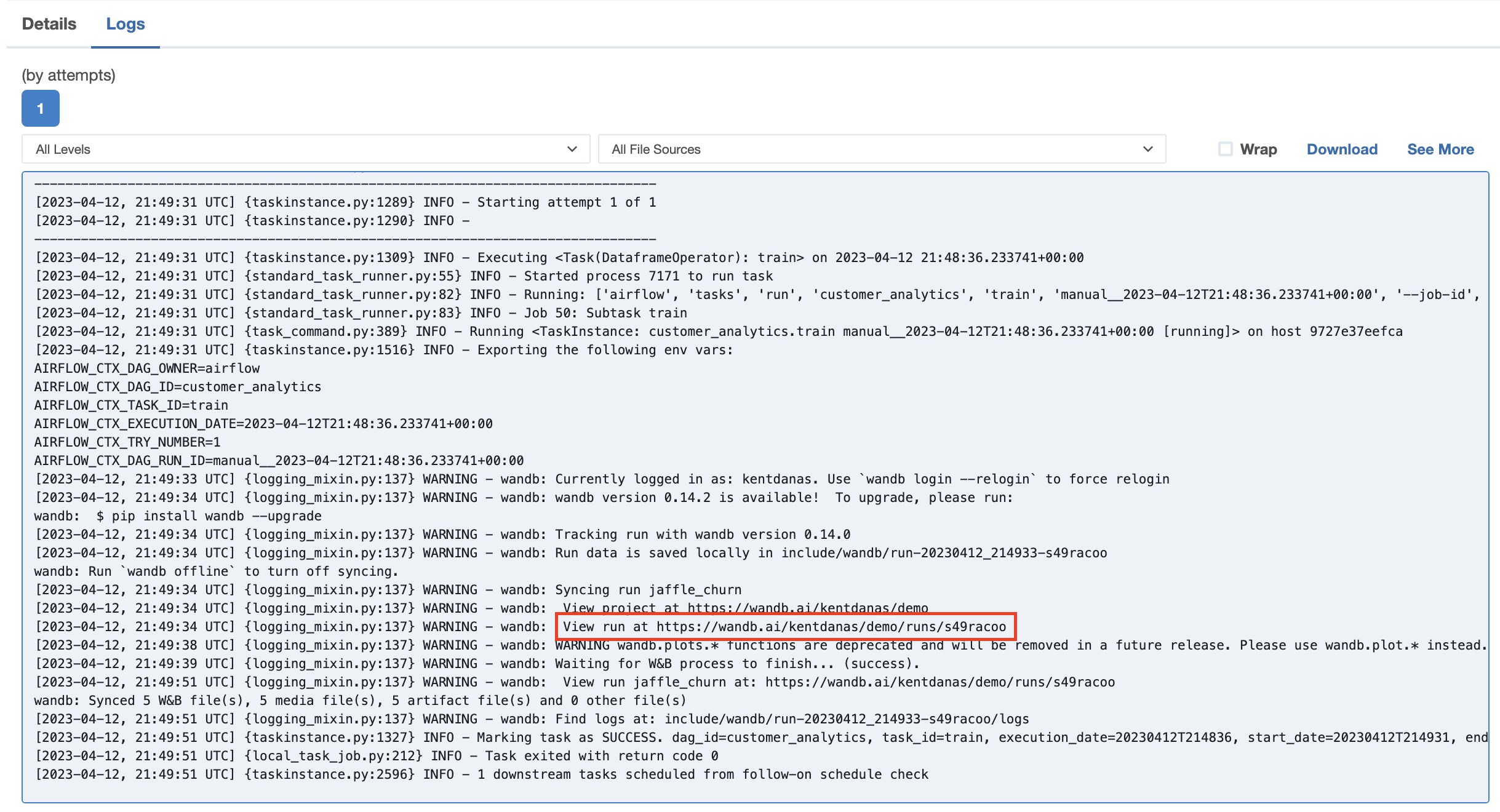
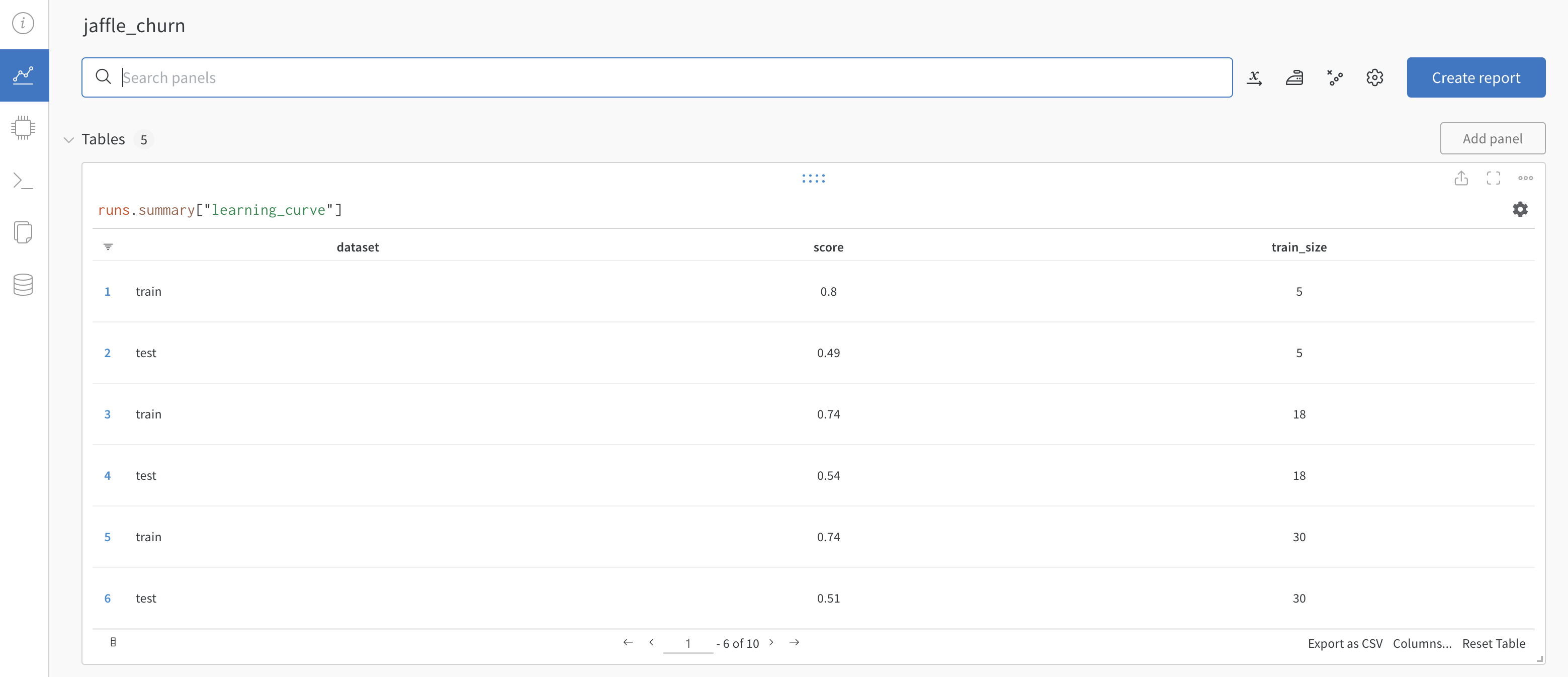
  2. The logs in the train and predict tasks will contain a link to your W&B project which shows plotted results from the training and prediction. wandb task logs Go to one of the links to view the results in W&B. wandb results