

Documentation Index
Fetch the complete documentation index at: https://astronomer-preview.mintlify.app/llms.txt
Use this file to discover all available pages before exploring further.
Info This page has not yet been updated for Airflow 3. The concepts shown are relevant, but some code may need to be updated. If you run any examples, take care to update import statements and watch for any other breaking changes.It is very common to run a task with different dependencies than your Airflow environment. Your task might need a different Python version than core Airflow, or it has packages that conflict with your other tasks. In these cases, running tasks in an isolated environment can help manage dependency conflicts and enable compatibility with your execution environments. In Airflow, you have several options for running custom Python code in isolated environments. This guide teaches you how to choose the right isolated environment option for your use case, implement different virtual environment operators and decorators, and access Airflow context and variables in isolated environments.
Other ways to learn There are multiple resources for learning about this topic. See also:
- Astronomer Academy: Airflow: The ExternalPythonOperator.
- Astronomer Academy: Airflow: The KubernetesPodOperator.
- Webinar: Running Airflow Tasks in Isolated Environments.
- Learn from code: Isolated environments example DAGs repository.
Info This guide covers options to isolate individual tasks in Airflow. If you want to run all of your Airflow tasks in dedicated Kubernetes pods, consider using the Kubernetes Executor. Astronomer customers can set their Deployments to use the KubernetesExecutor in the Astro UI, see Manage Airflow executors on Astro.
Assumed knowledge
To get the most out of this guide, you should have an understanding of:- Airflow decorators. See Introduction to the TaskFlow API and Airflow decorators.
- Airflow operators. See Airflow operators.
- Python Virtual Environments. See Python Virtual Environments: A Primer.
- Kubernetes basics. See the Kubernetes Documentation.
When to use isolated environments
There are two situations when you might want to run a task in an isolated environment:- Your task requires a different version of Python than your Airflow environment. Apache Airflow is compatible with and available in Python 3.8, 3.9, 3.10, 3.11, and 3.12. The Astro Runtime has images available for all supported Python versions, so you can run Airflow inside Docker in a reproducible environment. See Prerequisites for more information.
-
Your task requires different versions of Python packages that conflict with the package versions installed in your Airflow environment. To know which Python packages are pinned to which versions within Airflow, you can retrieve the full list of constraints for each Airflow version by going to:
Airflow Best Practice
Make sure to pin all package versions, both in your core Airflow environment (requirements.txt) and in your isolated environments. This helps you avoid unexpected behavior due to package updates that might create version conflicts.
Limitations
When creating isolated environments in Airflow, you might not be able to use common Airflow features or connect to your Airflow environment in the same way you would in a regular Airflow task. Common limitations include:- You cannot pass all Airflow context variables to a virtual decorator, since Airflow does not support serializing
var,ti, andtask_instanceobjects. See Use Airflow context variables in isolated environments. - You do not have access to your secrets backend from within the isolated environment. To access your secrets, consider passing them in through Jinja templating. See Use Airflow variables in isolated environments.
- Installing Airflow itself, or Airflow provider packages in the environment provided to the
@task.external_pythondecorator or the ExternalPythonOperator, can lead to unexpected behavior. If you need to use Airflow or an Airflow provider module inside your virtual environment, Astronomer recommends using the@task.virtualenvdecorator or the PythonVirtualenvOperator instead. See Use Airflow packages in isolated environments.
Choosing an isolated environment option
Airflow provides several options for running tasks in isolated environments. To run tasks in a dedicated Kubernetes Pod you can use:@task.kubernetesdecorator- KubernetesPodOperator (KPO)
@task.external_pythondecorator / ExternalPythonOperator (EPO)@task.virtualenvdecorator / PythonVirtualenvOperator (PVO)@task.branch_external_pythondecorator / BranchExternalPythonOperator (BEPO)@task.branch_virtualenvdecorator / BranchPythonVirtualenvOperator (BPVO)
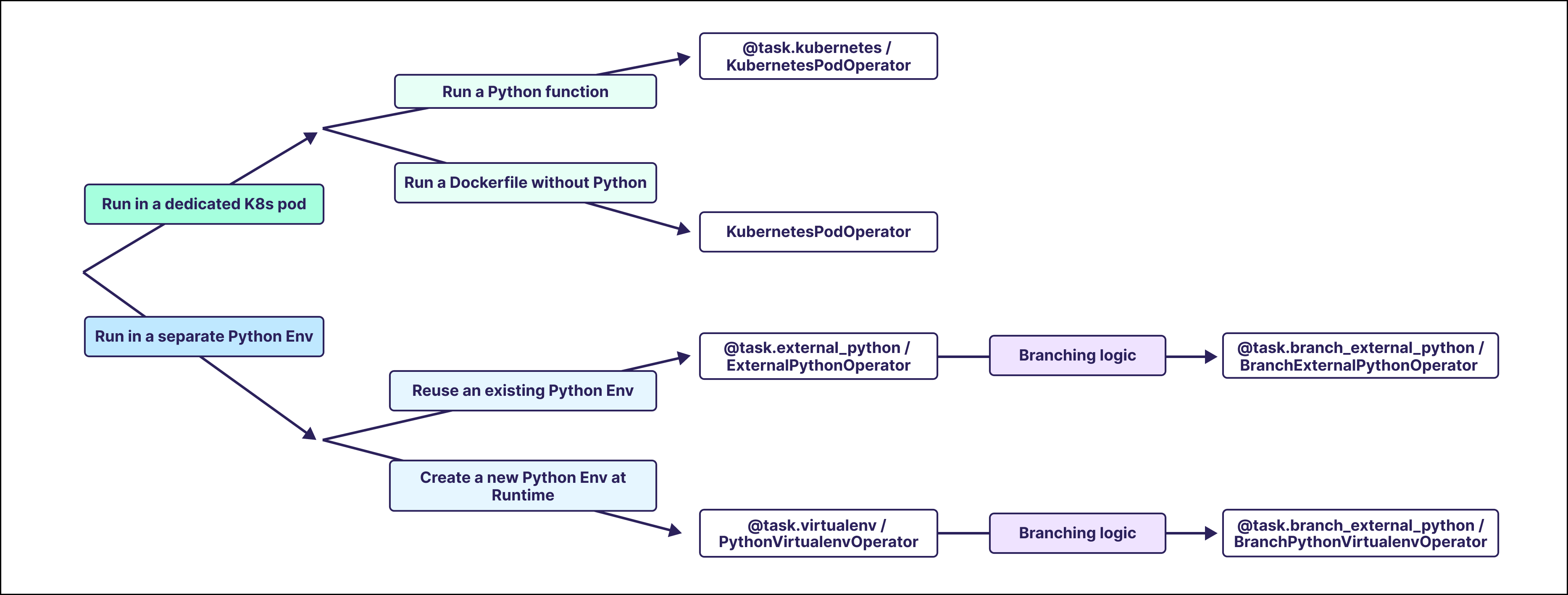 Which option you choose depends on your use case and the requirements of your task. The table below shows which decorators and operators are best for particular use cases.
| Use Case | Implementation Options |
|---|---|
| Run a Python task in a K8s Pod | @task.kubernetes,KubernetesPodOperator |
| Run a Docker image without additional Python code in a K8s Pod | KubernetesPodOperator |
| Run a Python task in an existing (reusable) virtual environment | @task.external_python,ExternalPythonOperator |
| Run a Python task in a new virtual environment | @task.virtualenv,PythonVirtualenvOperator |
| Run branching code in an existing (reusable) virtual environment | @task.branch_external_python, BranchExternalPythonOperator |
| Run branching code in a new virtual environment | @task.branch_virtualenv, BranchPythonVirtualenvOperator |
| Install different packages for each run of a task | PythonVirtualenvOperator, BranchPythonVirtualenvOperator |
| Requirements | Decorators | Operators |
|---|---|---|
| A Kubernetes cluster | @task.kubernetes | KubernetesPodOperator |
| A Docker image | @task.kubernetes (with Python installed) | KubernetesPodOperator (with or without Python installed) |
| A Python binary | @task.external_python,@task.branch_external_python,@task.virtualenv (*),@task.branch_virtualenv (*) | ExternalPythonOperator, BranchExternalPythonOperator, PythonVirtualenvOperator (*), BranchPythonVirtualenvOperator (*) |
External Python operator
The ExternalPython operator,@task.external_python decorator or ExternalPythonOperator, runs a Python function in an existing virtual Python environment, isolated from your Airflow environment. To use the @task.external_python decorator or the ExternalPythonOperator, you need to create a separate Python environment to reference. You can use any Python binary created by any means.
The easiest way to create a Python environment when using the Astro CLI is with the Astronomer PYENV BuildKit. The BuildKit can be used by adding a comment on the first line of the Dockerfile as shown in the following example. Adding this comment enables you to create virtual environments with the PYENV keyword.
Note To use the BuildKit, the Docker BuildKit Backend needs to be enabled. This is the default as of Docker Desktop version 23.0, but might need to be enabled manually in older versions of Docker.You can add any Python packages to the virtual environment by putting them into a separate requirements file. In this example, by using the name
epo_requirements.txt. Make sure to pin all package versions.
Warning
Installing Airflow itself and Airflow provider packages in isolated environments can lead to unexpected behavior and is not recommended. If you need to use Airflow or Airflow provider modules inside your virtual environment, Astronomer recommends to choose the @task.virtualenv decorator or the PythonVirtualenvOperator. See Use Airflow packages in isolated environments.
After restarting your Airflow environment, you can use this Python binary by referencing the environment variable ASTRO_PYENV_<my-pyenv-name>. If you choose an alternative method to create you Python binary, you need to set the python parameter of the decorator or operator to the location of your Python binary.
To get a list of all parameters of the @task.external_python decorator / ExternalPythonOperator, see the Airflow Registry.
Virtualenv operator
The Virtualenv operator (@task.virtualenv or PythonVirtualenvOperator) creates a new virtual environment each time the task runs. If you only specify different package versions and use the same Python version as your Airflow environment, you do not need to create or specify a Python binary.
Warning Installing Airflow itself and Airflow provider packages in isolated environments can lead to unexpected behavior and is generally not recommended. See Use Airflow packages in isolated environments.Since the
requirements parameter of the PythonVirtualenvOperator is templatable, you can use Jinja templating to pass information at runtime. For example, you can use a Jinja template to install a different version of pandas for each run of the task.
Note To use the BuildKit, the Docker BuildKit Backend needs to be enabled. This is the default starting in Docker Desktop version 23.0, but might need to be enabled manually in older versions of Docker.The Python version can be referenced directly using the
python parameter of the decorator/operator.
To get a list of all parameters of the @task.virtualenv decorator or PythonVirtualenvOperator, see the Airflow Registry.
Kubernetes pod operator
The Kubernetes operator,@task.kubernetes decorator or KubernetesPodOperator, runs an Airflow task in a dedicated Kubernetes pod. You can use the @task.kubernetes to run any custom Python code in a separate Kubernetes pod on a Docker image with Python installed, while the KubernetesPodOperator runs any existing Docker image.
To use the @task.kubernetes decorator or the KubernetesPodOperator, you need to provide a Docker image and have access to a Kubernetes cluster. The following example shows how to use the modules to run a task in a separate Kubernetes pod in the same namespace and Kubernetes cluster as your Airflow environment. For more information on how to use the KubernetesPodOperator, see Use the KubernetesPodOperator and Run the KubernetesPodOperator on Astro.
Virtual branching operators
Virtual branching operators allow you to run conditional task logic in an isolated Python environment.@task.branch_external_pythondecorator or BranchExternalPythonOperator: Run conditional task logic in an existing virtual Python environment.@task.branch_virtualenvdecorator or BranchPythonVirtualenvOperator: Run conditional task logic in a newly created virtual Python environment.
Use Airflow context variables in isolated environments
Some variables from the Airflow context can be passed to isolated environments, for example thelogical_date of the DAG run. Due to compatibility issues, other objects from the context such as ti cannot be passed to isolated environments. For more information, see the Airflow documentation.
Use Airflow variables in isolated environments
You can inject Airflow variables into isolated environments by using Jinja templating in theop_kwargs argument of the PythonVirtualenvOperator or ExternalPythonOperator. This strategy lets you pass secrets into your isolated environment, which are masked in the logs according to rules described in Hide sensitive information in Airflow variables.
Use Airflow packages in isolated environments
Warning Using Airflow packages inside of isolated environments can lead to unexpected behavior and is not recommended.If you need to use Airflow or an Airflow provider module inside your virtual environment, use the
@task.virtualenv decorator or the PythonVirtualenvOperator instead of the @task.external_python decorator or the ExternalPythonOperator.
As of Airflow 2.8, you can cache the virtual environment for reuse by providing a venv_cache_path to the @task.virtualenv decorator or PythonVirtualenvOperator, to speed up subsequent runs of your task.