

TheDocumentation Index
Fetch the complete documentation index at: https://astronomer-preview.mintlify.app/llms.txt
Use this file to discover all available pages before exploring further.
@asset decorator is a shorthand to create one Dag with one task that updates an asset. This decorator is used in the asset-oriented approach to writing Dags which constitutes a mindset shift to put the data asset front and center. Whether you use the asset-oriented or task-oriented approach to writing Dags is a matter of preference. Dags created using the asset-oriented approach are shown like any other Dag in the Airflow UI.
In this guide, you’ll learn:
- How to use
@assetto create a Dag with one task that updates an asset. - How to use
@asset.multito create a Dag with one task that updates multiple assets.
Assumed knowledge
To get the most out of this guide, you should have an existing knowledge of:- Airflow basic asset-based scheduling. See Basic asset-based scheduling in Apache Airflow®.
- Airflow decorators. See Introduction to the TaskFlow API and Airflow decorators.
Using @asset
The following code snippet defines a Dag with the Dag IDmy_asset that runs on a @daily schedule. It contains one task with the task ID my_asset that, upon successful completion updates an asset with the name my_asset.
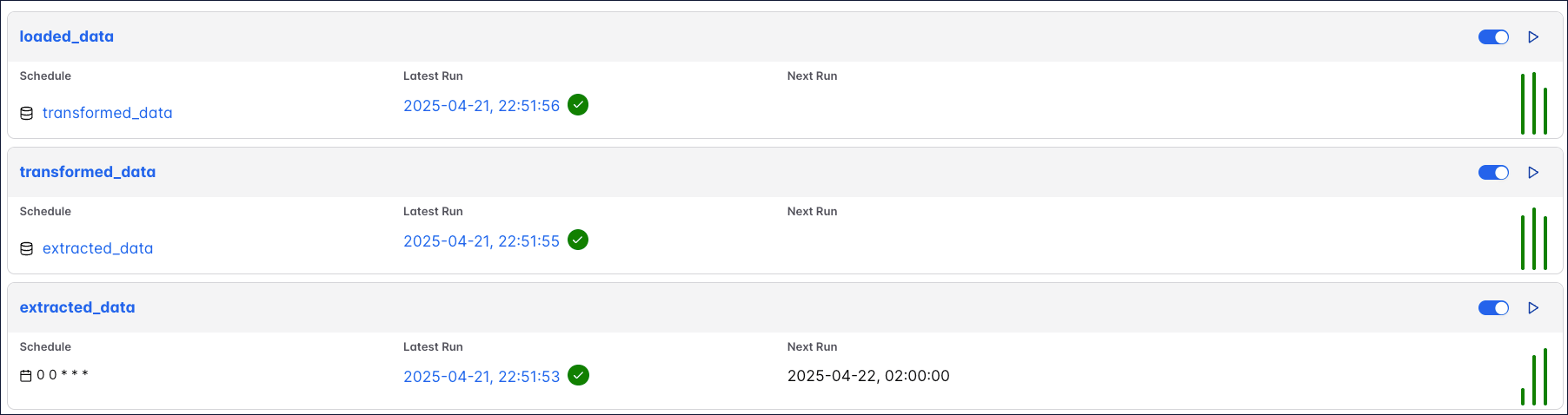
@asset decorator creates one Dag, data needs to be passed between tasks using cross-Dag XComs. The following shows the same simple ETL pipeline accomplished using the asset-oriented and the task-oriented approach.
The code above creates three Dags that depend on each other, each containing one task that updates one asset:
@asset.multi
To update several assets from the same Dag written with the asset-oriented approach, you can use@asset.multi. The code example below will create one Dag with the Dag ID my_multi_asset that contains one task called my_multi_asset that, upon successful completion, updates two assets with the names asset_a and asset_b.