

With Assets, Dags that access the same data can have explicit, visible relationships, and Dags can be scheduled based on updates to these assets. This feature helps make Airflow data-aware and expands Airflow scheduling capabilities beyond time-based methods such as cron. The basics of asset-based scheduling, including fundamental concepts and terminology, are covered in Basic asset-based scheduling in Apache Airflow®. This guide covers advanced asset-based scheduling concepts. In this guide, you’ll learn:Documentation Index
Fetch the complete documentation index at: https://astronomer-preview.mintlify.app/llms.txt
Use this file to discover all available pages before exploring further.
- How to use conditional asset scheduling to schedule a Dag based on an asset expression.
- How to use combined asset and time-based scheduling to schedule a Dag based on both a time-based schedule (cron or any other Timetable) plus whenever an asset expression is fulfilled.
- How to use partitioned asset schedules.
- How to attach extra information to, and retrieve extra information from, asset events.
- How to use asset aliases to create dynamic asset schedules.
- How to use asset listeners to run code when certain asset events occur anywhere in your Airflow instance.
This guide covers data-aware schedules with Assets, for more information on the
@asset decorator shorthand see @asset syntax in Apache Airflow®.Assumed knowledge
To get the most out of this guide, you should have an existing knowledge of:- Airflow scheduling concepts. See Schedule Dags in Airflow.
- Basic asset-based scheduling. See Basic asset-based scheduling in Apache Airflow®.
Advanced asset concepts
When using asset-based scheduling, updates are produced to assets, creating asset events. These updates can be created by different methods, the most common one being to set theoutlets parameter of a task to a list of assets to update upon successful completion. Dags can be scheduled based on asset events created for one or more assets, and tasks can be given access to all events attached to an asset by defining the asset as one of their inlets.
In addition to these fundamental concepts covered in the Basic asset-based scheduling in Apache Airflow® guide, when using advanced techniques for asset-based scheduling, you should understand the following terms:
- Asset expression: a logical expression using AND (
&) and OR (|) operators to define the schedule of a Dag scheduled on updates to several assets. - AssetAlias: an object that can be associated with one or more assets and used to create schedules based on assets created at runtime, see Asset aliases.
- Metadata: a class to attach
extrainformation to an asset event from within the producer task. This functionality can be used to pass asset event-related metadata between tasks, see Attach extra information and Retrieve extra information. - AssetWatcher: a class that is used in event-driven scheduling to watch for a
TriggerEventcaused by a message in a message queue. - Queued asset event: It is common to have Dags scheduled to run as soon as a set of assets have received at least one update each. While there are still asset events missing to trigger the Dag, all asset events for other assets the Dag is scheduled on are queued asset events. A queued asset event is defined by its asset, timestamp and the Dag it is queuing for. One asset event can create a queued asset event for several Dags. You can access queued asset events for a specific Dag or a specific asset programmatically, using the Airflow REST API.
Airflow is only aware of updates to assets that occur by tasks, API calls, or in the Airflow UI, see Methods to update an asset. It does not monitor updates to assets that occur outside of Airflow. For example, Airflow will not notice if you manually add a file to an S3 bucket referenced by an asset. See When not to use Airflow assets for more information.
Assets events are only registered by Dags or listeners in the same Airflow environment. If you want to create cross-Deployment dependencies with Assets you will need to use the Airflow REST API to create an asset event in the Airflow environment where your downstream Dag is located. See the Cross-deployment dependencies for an example implementation on Astro.
Conditional asset scheduling
When using basic asset-based scheduling, you can schedule a Dag based on one or more assets by providing a list of assets to theschedule parameter. If you provide more than one asset, the Dag will run when all of the assets have received at least one update each.
For more complex scheduling needs, you can use conditional asset scheduling to schedule a Dag based on an asset expression.
An asset expression is a logical expression using AND (&) and OR (|) operators to define the schedule of a Dag scheduled on updates to several assets. The asset expression is given to the schedule parameter, wrapped in ().
For example, to schedule a Dag on an update to either asset1, asset2, asset3, or asset4, you can use the following syntax.
The downstream1_on_any Dag is triggered whenever any of the assets asset1, asset2, asset3, or asset4 are updated. The schedule of the Dag is listed as x of 4 Assets updated in the Airflow UI, you can see the asset expression that defines the schedule as a pop up when clicking on the schedule.
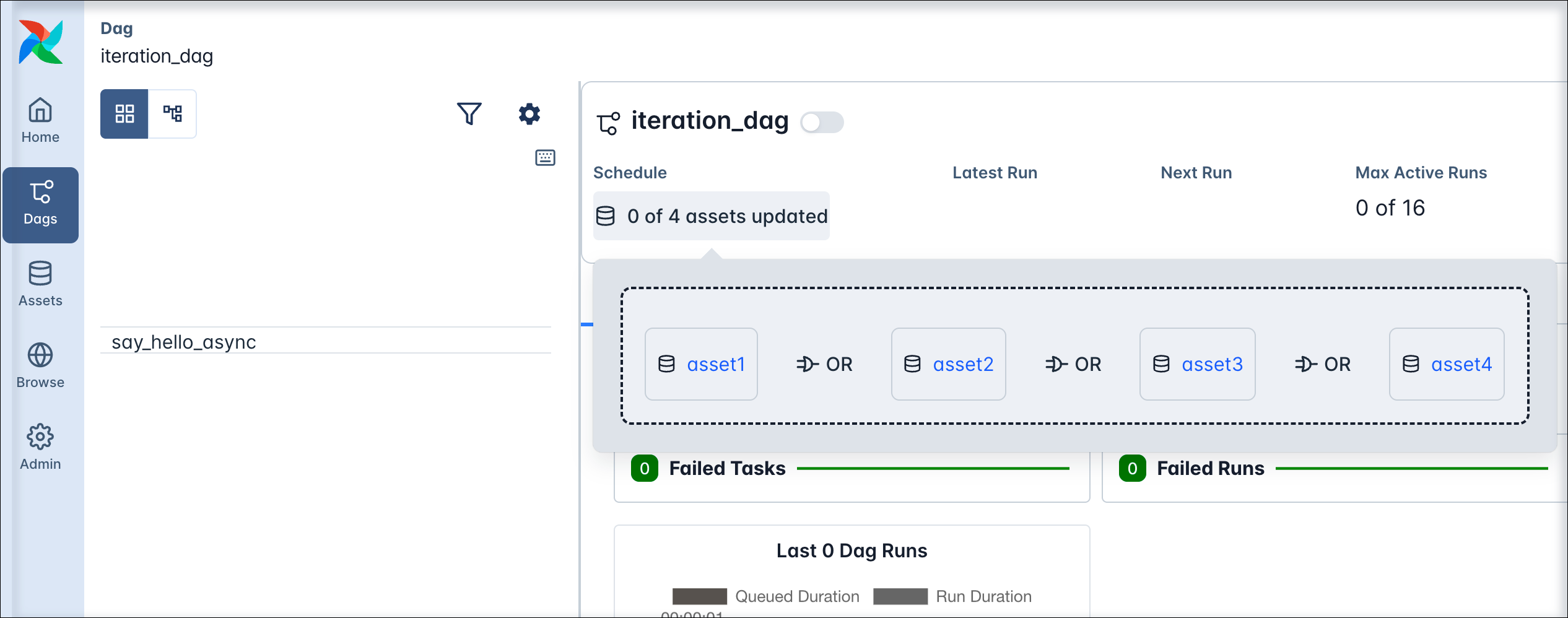 You can also combine the logical operators to create more complex expressions. For example, to schedule a Dag on an update to either
 asset1 or asset2 and either asset3 or asset4, you can use the following syntax:
Combined asset and time-based scheduling
You can combine asset-based scheduling with time-based scheduling with theAssetOrTimeSchedule timetable. A Dag scheduled with this timetable will run either when its timetable condition is met or when its asset condition is met. You can use any Timetable in the timetable parameter.
The Dag shown below runs on a time-based schedule defined by the 0 0 * * * cron expression, which is every day at midnight. The Dag also runs when either asset3 or asset4 is updated.
Partitioned asset schedules
Airflow 3.2 introduced the concept of partitioned Dag runs and partitioned asset events, which have apartition_key attached to them. The partition key can be used in tasks in a partitioned Dag run to partition data, for example in a SQL statement.
To schedule a Dag based on partitioned asset events, you set its schedule parameter to an instance of PartitionedAssetTimetable.
my_partitioned_asset is updated by a partitioned asset event, not by regular asset events.
You can modify the partition key by providing a partition_key_mapper to the PartitionedAssetTimetable instance, for example to change the time grain of the partition key to daily or weekly.
There are three ways to create a partitioned asset event:
- By updating an asset manually in the Airflow UI and providing a
partition_keyin the asset event creation dialog. - By updating an asset using the Airflow REST API and providing a
partition_keyin the request body. - By updating an asset using the
outletsparameter of a task in a Dag that is scheduled using aCronPartitionTimetabletimetable.
Partitioned asset events created by a task in a Dag using the
CronPartitionTimetable timetable are intended for partition-aware downstream scheduling, and do not trigger non-partition-aware Dags.Asset event extras
You can attach extra information to an asset event and retrieve it in downstream tasks. This is useful for passing metadata between tasks, for example information about the asset you are working with.Attach extra information
When updating an asset in the Airflow UI or making aPOST request to the Airflow REST API, you can attach extra information to the asset event by providing an extra json payload.
You can add extra information from within the producing task using either the Metadata class or accessing outlet_events from the Airflow context. The information passed needs to be json serializable.
To use the Metadata class to attach information to an asset, follow the example in the code snippet below. Make sure that the asset used in the metadata class is also defined as an outlet in the producer task.
You can also access the outlet_events from the Airflow context directly to add an extra dictionary to an asset event.
Asset extras can be viewed in the Airflow UI in the asset graph of an asset.
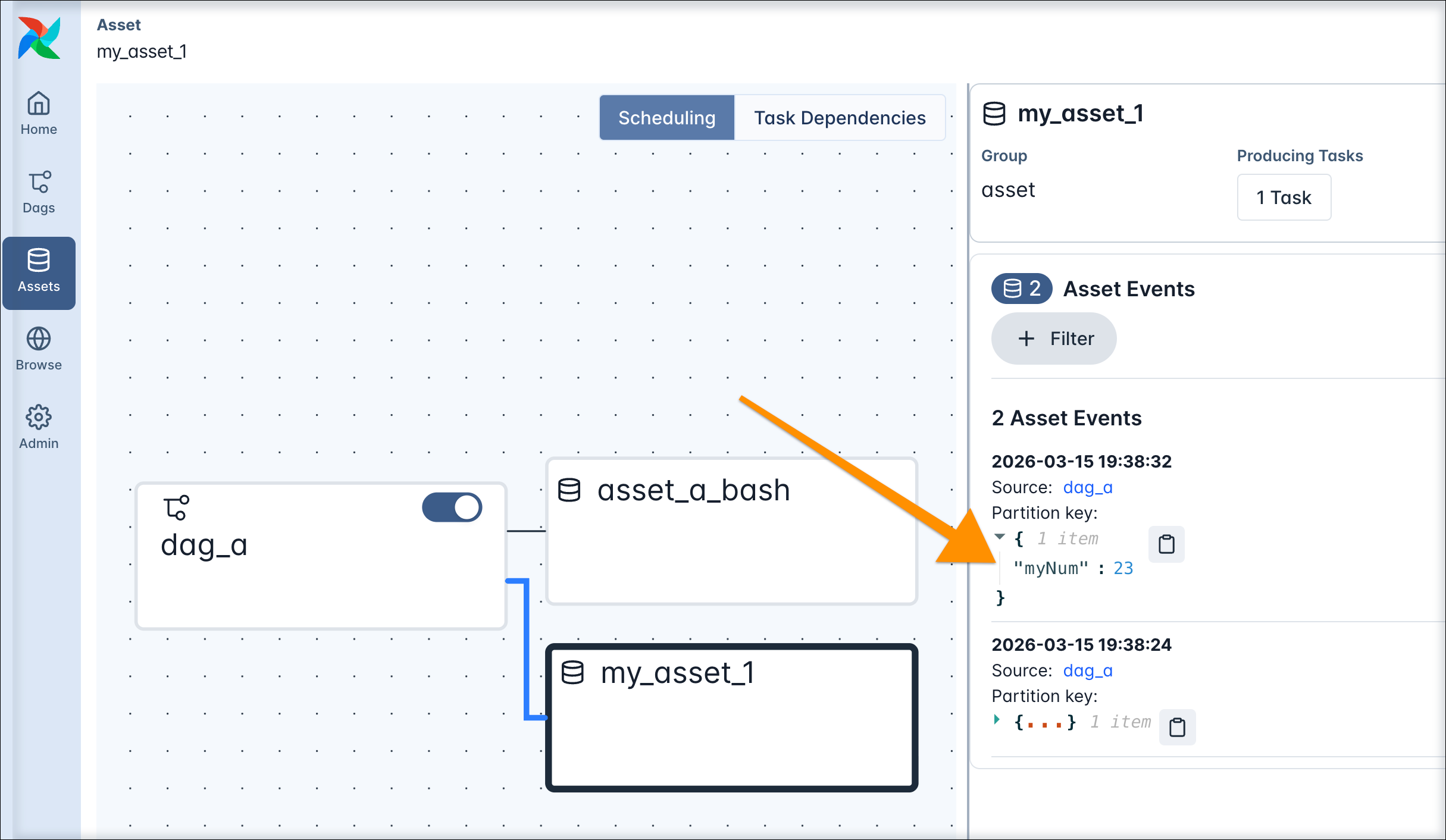
Retrieve extra information
Extras attached to asset events can be programmatically retrieved from within Airflow tasks. Any Airflow task instance in a Dag run has access to the list of assets that were involved in triggering that specific Dag run. Additionally, you can give any Airflow task access to all asset events of a specific asset by providing the asset to the task’sinlets parameter. Defining inlets does not affect the schedule of the Dag.
To access all asset events that were involved in triggering a Dag run within a TaskFlow API task, you can pull triggering_asset_events from the Airflow context. In a traditional operator, you can use Jinja templating in any templateable field of the operator to access information in the Airflow context.
If you want to access asset extras independently from which asset events triggered a Dag run, you have the option to directly provide an asset to a task as an inlet. In a TaskFlow API task you can fetch the inlet_events from the Airflow context.
Asset aliases
You have the option to create asset aliases to schedule Dags based on assets with names generated at runtime. An asset alias is defined by a uniquename string and can be used in place of a regular asset in outlets and schedules. Any number of asset events updating different assets can be attached to an asset alias.
There are two ways to add an asset event to an asset alias:
- Using the
Metadataclass. - Using
outlet_eventspulled from the Airflow context.
my_producer_dag containing the attach_event_to_alias_metadata task completes successfully, reparsing of all Dags scheduled on the asset alias my_alias is automatically triggered. This reparsing step attaches the updated_{bucket_name} asset to the my_alias asset alias and the schedule resolves, triggering one run of the my_consumer_dag.
Any further asset event for the updated_{bucket_name} asset will now trigger the my_consumer_dag. If you attach asset events for several assets to the same asset alias, a Dag scheduled on that asset alias will run as soon as any of the assets that were ever attached to the asset alias receive an update.
See Scheduling based on asset aliases for more information and examples of using asset aliases.
To use asset aliases with traditional operators, you need to attach the asset event to the alias inside the operator logic. If you are using operators besides the PythonOperator, you can either do so in a custom operator’s .execute method or by passing a post_execute callable to existing operators (experimental). Use outlet_events when attaching asset events to aliases in traditional or custom operators. Note that for deferrable operators, attaching an asset event to an alias is only supported in the execute_complete or post_execute method.
Asset listeners
A listener is a type of Airflow plugin that can be used to run custom code when certain events occur anywhere in your Airflow instance. There are four listener hooks relating to asset events:on_asset_created: runs when a new asset is created.on_asset_alias_created: runs when a new asset alias is created.on_asset_changed: runs when any asset change occurs.on_asset_event_emitted: runs when an asset event is emitted, generally called together withon_asset_changed.
@hookimpl-decorated function for your listener hook of choice and then register them in an Airflow plugin.