

When you’re using a data orchestration tool, how do you know when something has gone wrong? Apache Airflow® users can check the Airflow UI to determine the status of their DAGs, but this is an inefficient way of managing errors systematically, especially if certain failures need to be addressed promptly or by multiple team members. Fortunately, Airflow has built-in notification mechanisms that can be leveraged to configure error notifications in a way that works for your organization. In this guide, you’ll learn the basics of Airflow notifications and how to set up common notification mechanisms including email, pre-built and custom notifiers, and SLAs. You’ll also learn how to leverage Airflow alerting when using Astro.Documentation Index
Fetch the complete documentation index at: https://astronomer-preview.mintlify.app/llms.txt
Use this file to discover all available pages before exploring further.
Assumed knowledge
To get the most out of this guide, you should have an understanding of:- Airflow DAGs. See Introduction to Airflow DAGs.
- Task dependencies. See Managing dependencies in Apache Airflow.
Airflow notification types
Airflow has a few options for notifying you on the status of your DAGs and tasks:- Email notifications: Most Airflow operators have parameters for setting email alerts in case of a task failure or retry. Use email alerts in production pipelines where task failures or retries need immediate attention by a data professional.
- Airflow callbacks: Callback parameters (
*_callback) exist both at the task and at the DAG level. You can pass any callable or Airflow notifier to these parameters, and Airflow will run them in the case of specific events, such as a task failure. Airflow callbacks offer a lot of flexibility to execute any code based on the state of a task or DAG. They are often used to define actions for specific instances of task failures or successes. - Airflow notifiers: Notifiers are custom classes for Airflow callbacks that can be easily reused and standardized. Provider packages can ship pre-built notifiers like the SlackNotifier. Notifiers can be provided to callback parameters to define which task or DAG state should cause them to be executed. A common use case for notifiers is standardizing actions for task failures across several Airflow instances.
- Airflow service-level agreements (SLAs): SLAs define the expected time it takes for a specific task to complete. If an SLA is missed, the callable or notifier provided to the
sla_miss_callbackparameter is executed. If you configure an SMTP connection, an email will be sent as well. Since an SLA miss does not stop a task from running, this type of notification is used when intervention is needed if a specific task is taking longer than expected.
default_args dictionary will apply it to all tasks in the DAG. You can see examples of this in the set DAG and task-level callbacks section.
Choose a notification type
It’s best practice to use pre-built solutions whenever possible. This approach makes your DAGs more robust by reducing custom code and standardizing notifications across different Airflow environments. If you want to deliver alerts to email, use email notifications for task failures or retries and the SmtpNotifier for other events such as successful task runs. If a notifier class exists for your use case, you should always use these methods instead of a custom callback. See the Airflow documentation for an up-to-date list of available Notifiers and the Apprise wiki for a list of services the Apprise notifier can connect to. A notifier can be provided to any callback parameter (*callback). Only use custom Airflow callbacks when no notifier is available for your use case.
Email notifications
If you have an SMTP connection configured in Airflow, you can use theemail, email_on_failure, and email_on_retry task parameters to send notification emails from Airflow.
default_args parameter.
airflow.cfg similar to this example:
AIRFLOW__SMTP__. For example, smtp_host can be specified by setting the AIRFLOW__SMTP__SMTP_HOST variable. For more on Airflow email configuration, see Email Configuration.
If you are using Astro, use environment variables to set up SMTP because the airflow.cfg cannot be directly edited.
Custom email notifications
By default, email notifications are sent in a standard format that are defined in theemail_alert() and get_email_subject_content() methods of the TaskInstance class:
subject_template and/or html_content_template variables in your airflow.cfg with the path to your jinja template files for subject and content respectively.
If you want to send emails out on a more customizable basis, you can also use Airflow’s callback functions to run custom functions that send email notifications. For example, if you want to send emails for successful task runs, you can provide an email function to the on_success_callback parameter:
Airflow callbacks
In Airflow you can define actions to be taken due to different DAG or task states using*_callback parameters:
on_success_callback: Invoked when a task or DAG succeeds.on_failure_callback: Invoked when a task or DAG fails.on_skipped_callback: Invoked when a task is skipped. Added in Airflow 2.9, this callback only exists at the task level, and is only invoked when an AiflowSkipException is raised, not when a task is skipped due to other reasons, like a trigger rule. See Callback Types.on_execute_callback: Invoked right before a task begins executing. This callback only exists at the task level.on_retry_callback: Invoked when a task is retried. This callback only exists at the task level.sla_miss_callback: Invoked when a task or DAG misses its defined Service Level Agreement (SLA). This callback is defined at the DAG level for DAGs with defined SLAs and will be applied to every task.
*_callback parameters or Airflow notifiers. To execute multiple functions, you can provide several callback items to the same callback parameter in a list.
Notifiers
Airflow notifiers are pre-built or custom classes and can be used to standardize and modularize the functions you use to send notifications. Notifiers can be passed to the relevant*_callback parameter of your DAG depending on what event you want to trigger the notification.
You can find a full list of all pre-built notifiers created for Airflow providers here and connect to many more services through the AppriseNotifier.
BaseNotifier class and defining the action which should be taken in case the notifier is used in the .notify() method.
Example pre-built notifier: Slack
An example of a community provided pre-built notifier is the SlackNotifier. It can be imported from the Slack provider package and used with any*_callback function:
slack_conn.

Set DAG and task-level custom callbacks
To define a custom notification at the DAG level, you can set the*_callback parameters in your DAG instantiation. DAG-level notifications will trigger callback functions based on the state of the entire DAG run.
default_args parameter. Items listed in the dictionary provided to the default_args parameter will be set for each task in the DAG.
default_args.
Airflow service-level agreements
Airflow service-level agreements (SLAs) are a type of notification that you can use if your tasks take longer than expected to complete. If a task takes longer than the maximum amount of time to complete as defined in the SLA, the SLA will be missed and notifications are triggered. This can be useful when you have long-running tasks that might require user intervention after a certain period of time, or if you have tasks that need to complete within a certain period. Exceeding an SLA does not stop a task from running. If you want tasks to stop running after a certain time, use timeouts. You can set an SLA for all tasks in your DAG by defining'sla' as a default argument, as shown in the following example DAG:
- SLAs are relative to the DAG execution date, not the task start time. For example, in the previous DAG the
sla_taskwill miss the 30 second SLA because it takes at least 40 seconds to complete. Thet1task will also miss the SLA, because it is executed more than 30 seconds after the DAG execution date. In that case, thesla_taskwill be considered blocking to thet1task. - SLAs will only be evaluated on scheduled DAG Runs. They will not be evaluated on manually triggered DAG Runs.
- SLAs can be set at the task level if a different SLA is required for each task. In the previous example, all task SLAs are still relative to the DAG execution date. For example, in the DAG below,
t1has an SLA of 500 seconds. If the upstream tasks (t0andsla_task) combined take 450 seconds to complete, andt1takes 60 seconds to complete, thent1will miss its SLA even though the task did not take more than 500 seconds to execute.
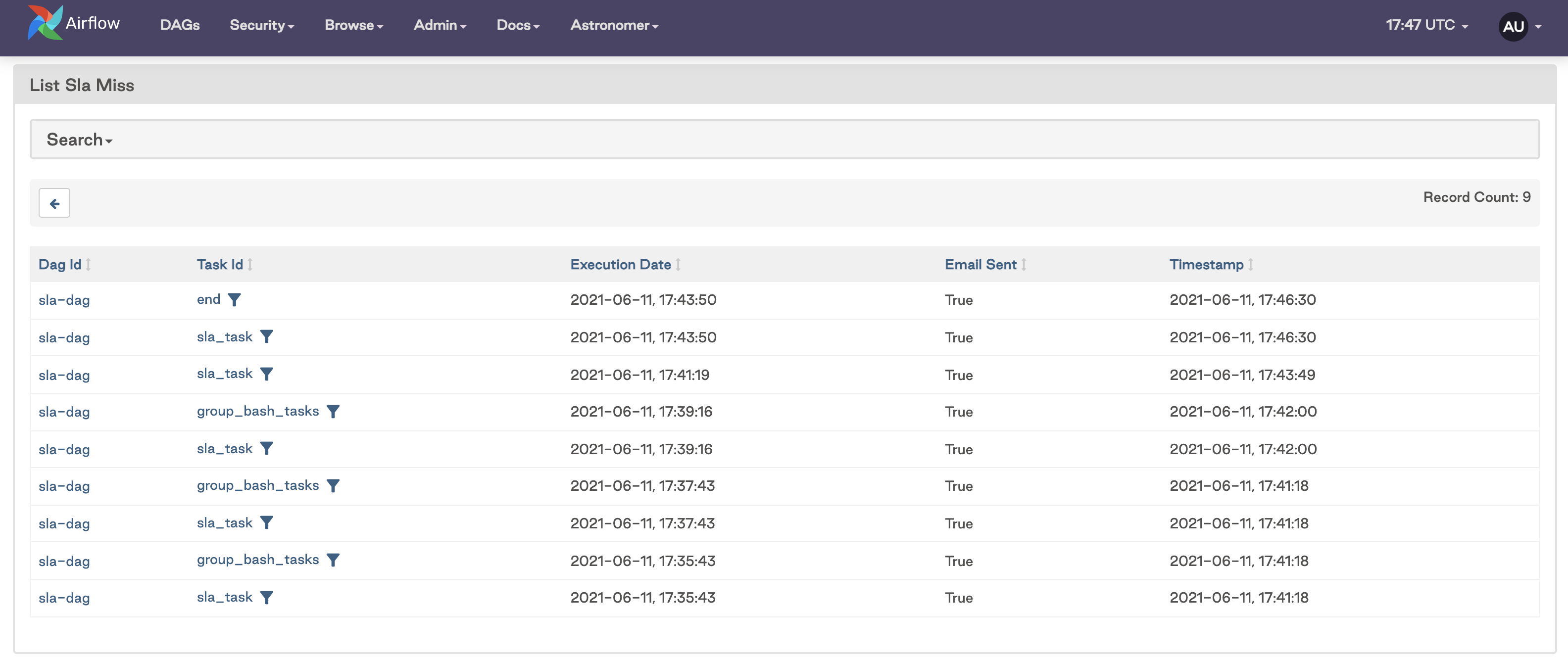 If you configured an SMTP server in your Airflow environment, you’ll receive an email with notifications of any missed SLAs similar to the following image:
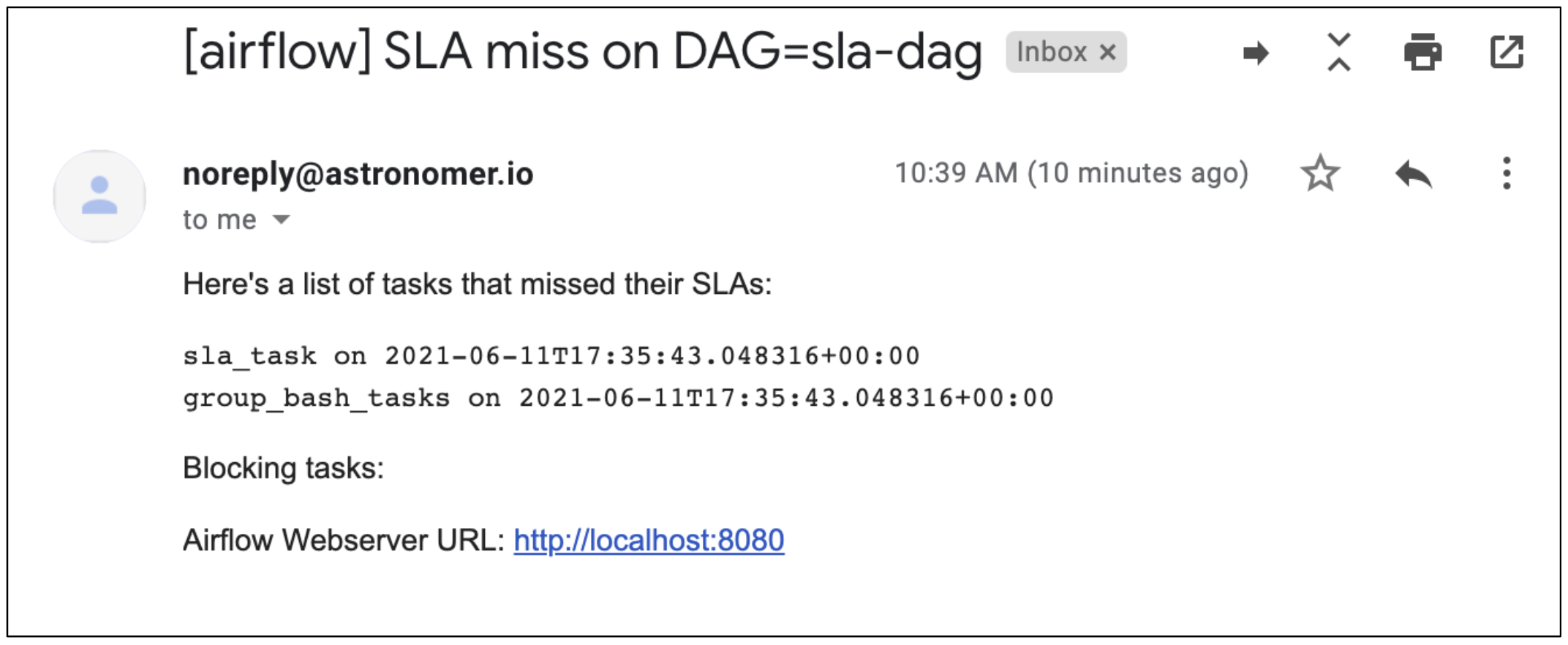 There is no functionality to disable email alerting for SLAs. If you have an
 'email' array defined and an SMTP server configured in your Airflow environment, an email will be sent to those addresses for each DAG run with missed SLAs.