

Documentation Index
Fetch the complete documentation index at: https://astronomer-preview.mintlify.app/llms.txt
Use this file to discover all available pages before exploring further.
This is feature is only available if you are on theEnterprisetier or above. SeeAstro Plans and Pricing.
Airflow 3This feature is only available for Airflow 3.x Deployments.
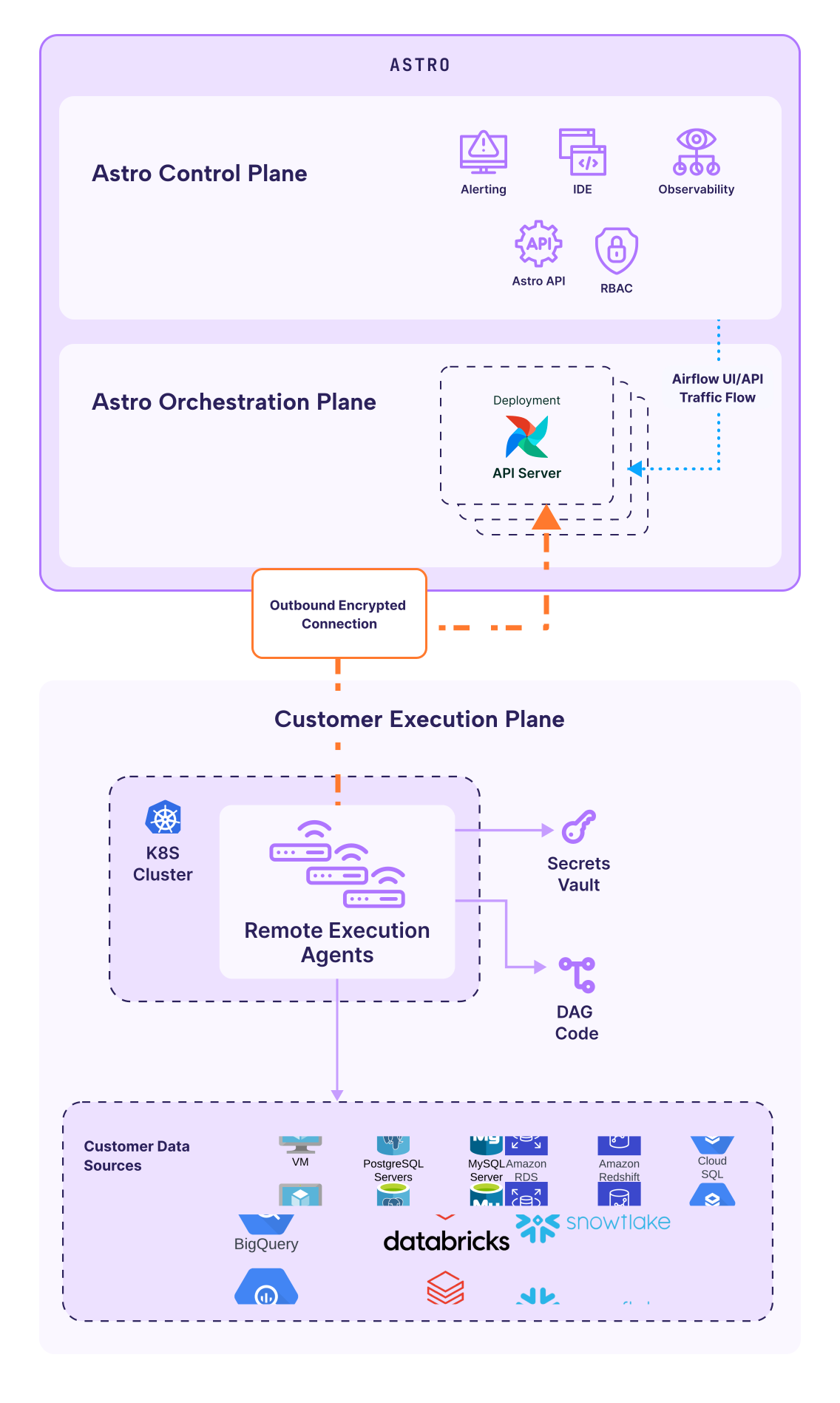
How Remote Execution works
Remote Execution uses a decoupled architecture with two planes: Orchestration plane (Astro-managed) The orchestration plane runs in Astro’s cloud infrastructure and includes:- Scheduler: Determines when dags and tasks should run
- Web Server/API Server: Provides the Airflow UI and REST API
- Metadata Database: Stores Dag and task metadata
- Remote Execution API: Manages agent communication and task distribution
- Remote Execution Agents: Deployed via Helm charts, each agent includes:
- Dag Processor: Parses and serializes Dag code
- Triggerer: Manages deferrable tasks
- Worker: Executes Airflow tasks
- Sentinel: Monitors agent health and reports status to the orchestration plane
Key concepts
Remote Execution Agents
Agents are the core component of Remote Execution. Each agent is a collection of Airflow components (Worker, Dag Processor, Triggerer) deployed as a single unit in your Kubernetes cluster. You can deploy multiple agents with unique configurations across different clusters, regions, or node types to meet your workload requirements. Agents communicate with Astro using:- Agent tokens: Authenticate agents to the orchestration plane
- Outbound-only connections: Enable communication from your infrastructure to Astro without requiring inbound traffic
- Heartbeat mechanism: Monitor agent health with regular status checks
Dag bundles
Dag bundles are collections of Dag files and supporting code. Remote Execution supports two types:- GitDagBundle: Dags stored in a Git repository (recommended for production)
- LocalDagBundle: Dags stored in the container image or persistent volume
XCom backend
XCom (cross-communication) allows Airflow tasks to share data. With Remote Execution, you must configure an object storage backend (AWS S3, Azure Blob Storage, or GCP Cloud Storage) to pass XCom data between tasks running on different agents.Secrets backend
Remote Execution Agents must be configured with a secrets backend to securely access Airflow connections and variables. This can be AWS Secrets Manager, Azure Key Vault, Google Cloud Secret Manager, or HashiCorp Vault.What you need to configure
Configure the following required and optional components for Remote Execution.Required components
- Remote Execution Agents: Deployed via Helm in your Kubernetes cluster
- Secrets Backend: To securely store and access Airflow connections and variables
- XCom Backend: Object storage for passing data between tasks
- Dag Sources: Configure how agents access your dag code (Git or local)
Recommended components
- Sentinel: Monitor agent health and report status to the orchestration plane. Astronomer recommends enabling Sentinel for all production deployments.
Optional components
- Logging: Export task logs to external logging platforms or object storage
- OpenLineage: Enable data lineage and observability features
Next steps
- Get started with Remote Execution - Set up prerequisites and follow the setup checklist
- Register and configure agents - Install and register your first agent