

Astro supports a range of options when it comes to adding your dbt project to your Deployment. To orchestrate dbt jobs with Apache Airflow, you first need to deploy your dbt project to Astro along with your dags and the rest of your Airflow code. This guide includes information on the different options your team has for deploying dbt code to Apache Airflow and Astro. Your team can choose the option that best fits your team’s software development lifecycle. For more information and recommendations on using dbt with Apache Airflow and Astro, see Orchestrate dbt Core jobs with Airflow and Cosmos.Documentation Index
Fetch the complete documentation index at: https://astronomer-preview.mintlify.app/llms.txt
Use this file to discover all available pages before exploring further.
Repository strategy
Depending on your organization’s software development lifecycle, there are three ways you can organize your dbt project relative to your Astro project:- In the same Git repository and directory as your Astro project.
- In the same Git repository but in a separate directory.
- In a separate Git repository.
Feature overview
Astro supports two basic dbt code deploy strategies. You can:- Include dbt code in your Astro project: Make dbt code directly available in the Docker image powered by Astro Runtime that contains your Astro project. This approach works best for small teams just starting to integrate dbt code in Astro.
- Use dbt Deploys: Independently deploy bundles of dbt code directly to Astro, outside the context of your Astro project and Docker image. Astronomer recommends this approach for teams who have dbt code in a dedicated directory or Git repository.
Option 1: Include dbt code in your Astro project [#option-1]
The most direct way to set up dbt on Astro is by including dbt code in your full image. To accomplish this, Astronomer recommends adding the directory/dbt to the top level of your Astro project and including individual dbt projects inside this directory.
Finally, to push your new dbt code to your Deployment, perform a deploy with the Astro CLI by running:
- Slower build times when changing only dbt code.
- dbt code must live in the same repository and directory as your Astro project.
- Multiple teams developing Airflow and dbt separately must re-deploy the entire Astro project for each iteration.
Option 2: Use dbt Deploys to independently ship dbt code [#option-2]
There is a hard limit of 10 dbt bundles per Astro Deployment
Prerequisites
- An Astro Deployment
- An Astro project. Astronomer supports both dbt Cloud and dbt Core.
- A dbt project
- The Astro CLI v1.28 or greater
Step 1: (Optional) Deploy your full Astro image
In order to first deploy a dbt project to Astro, Astronomer recommends that you have an Astro project already running on your Deployment with dags that need to read from dbt. That way, your dbt project will be read and used when you deploy it. If you are using a new Deployment, first deploy your Astro project with the Astro CLI by running:Step 2: Deploy your dbt project
Next, navigate to the directory of your dbt project. This directory should include thedbt_project.yml file, as in the case of the Classic dbt Jaffle Shop in the following example:
astro dbt deploy attaches the dbt code to the default path of /usr/local/airflow/dbt/<dbt-project-name>.
See astro dbt deploy for more information about this command.
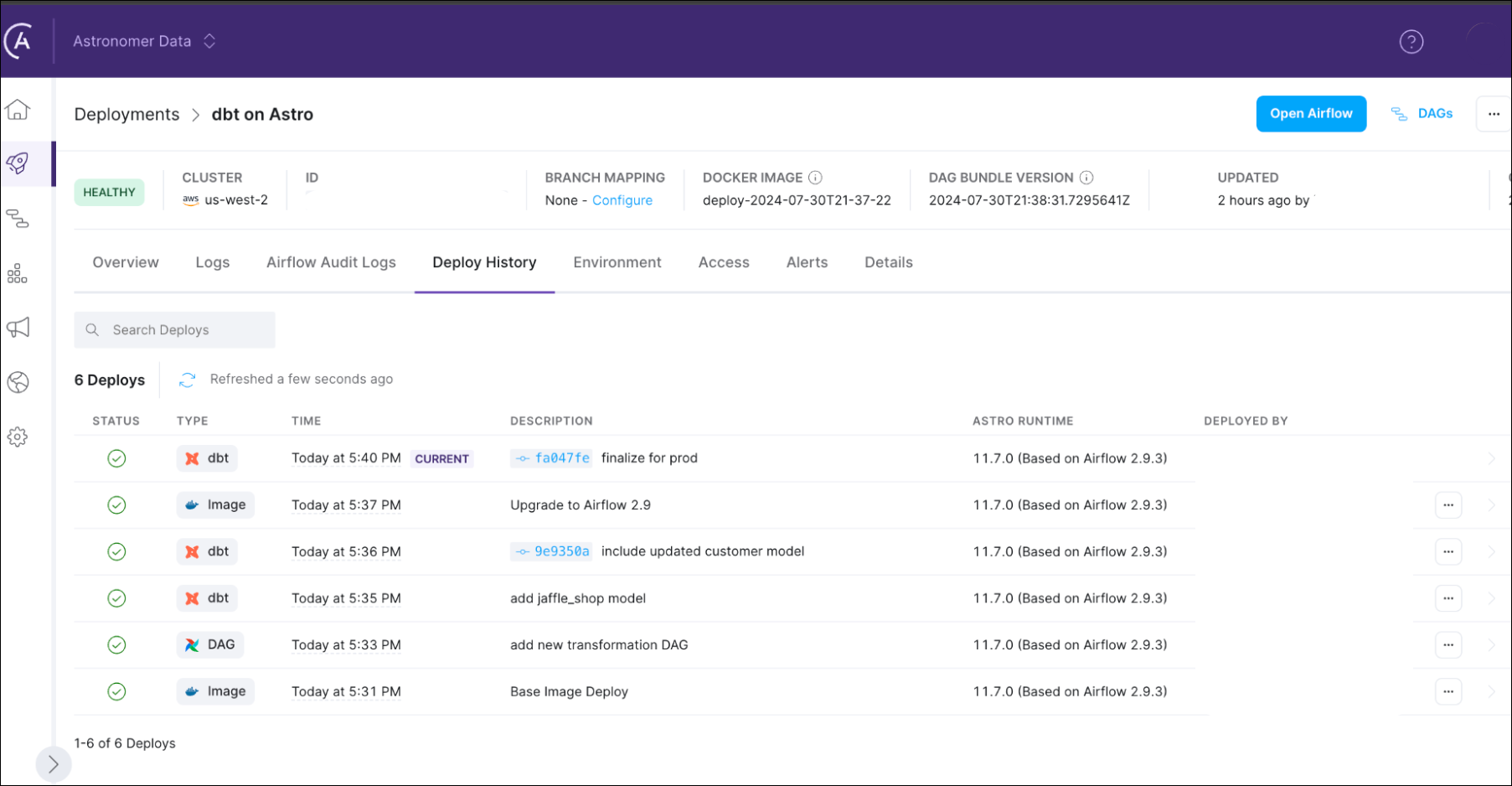
Congratulations, you’ve added your dbt code to your Deployment! Check the Astro UI to see more information about your dbt Deploy.
Delete your dbt project
If you want to remove dbt code from your deployment, you can also delete the dbt project from the Airflow environments where you deployed it. This command does not delete your dbt project source files. It only removes your project from the Airflow containers where it was mounted. When you run this command, you will be prompted to choose the Deployment from which you want to remove the project.astro dbt delete for more information about this command.