

Use this guide to remove a data plane cluster from your Astro Private Cloud (APC) control plane.Documentation Index
Fetch the complete documentation index at: https://astronomer-preview.mintlify.app/llms.txt
Use this file to discover all available pages before exploring further.
Only aSystem Admincan deregister a data plane cluster.
Prerequisites
- Make sure there are no running Airflow Deployments in the data plane cluster.
- Check that your automation configurations and scripts, such as your CI/CD or IaC, do not reference this cluster.
Deregister via the UI
- In the Astro Private Cloud UI, go to the Clusters page.
- Click See More […] on the cluster that you want to deregister.
- Click Deregister Cluster.
- Click Deregister.
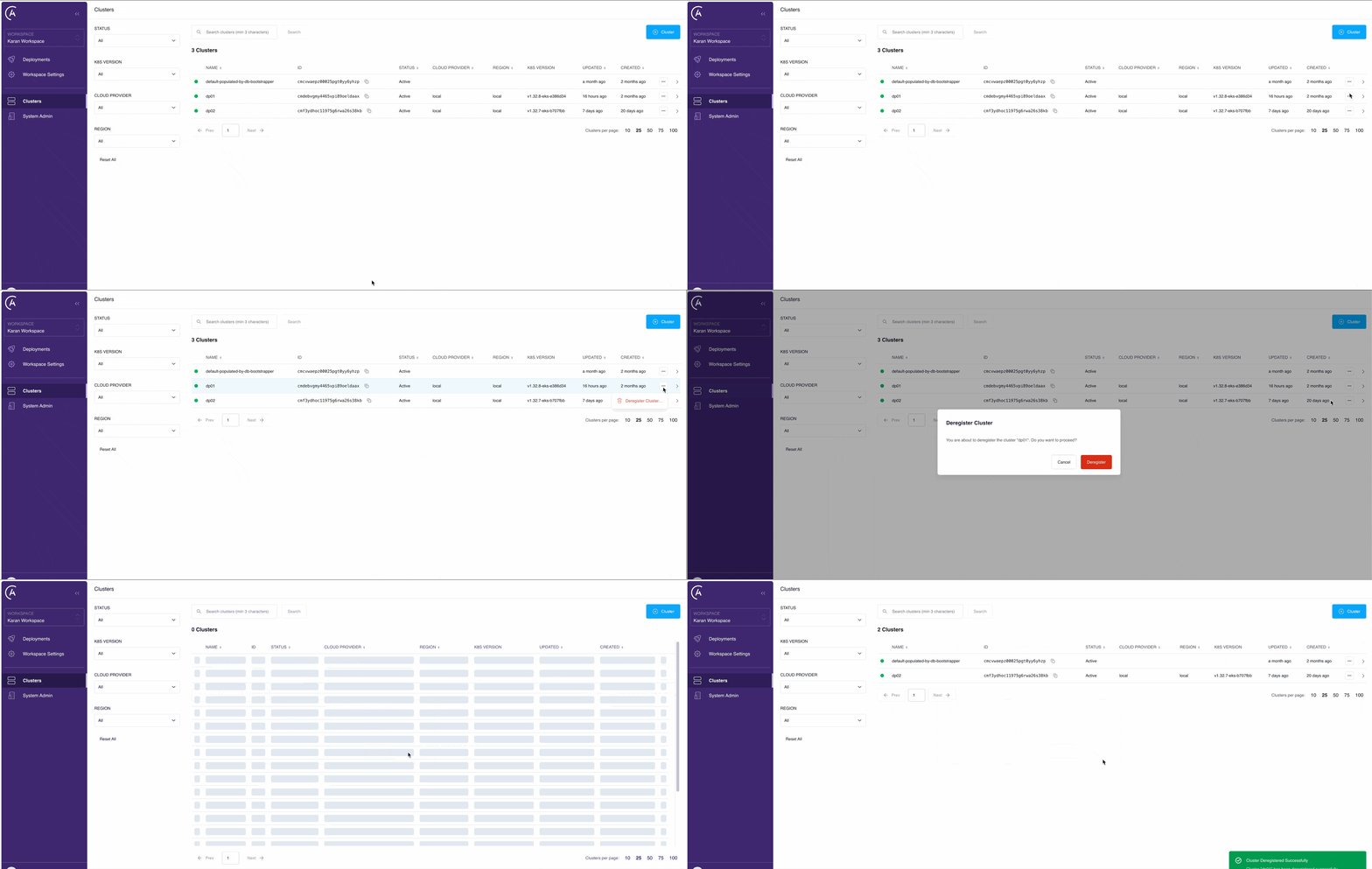 This removes the control plane association. Now, platform services no longer target this data plane cluster.
Deregistering a data plane cluster does not delete existing platform resources such as namespaces, services, or persistent volumes in your cloud environment. If you want to fully remove these resources, you must manually delete the Helm release.